CCR3- How did my production skills develop throughout this project?
My Creative Critical Reflection:
CCR3 by Freya James (LVH)
A recorded letter to a possible future Media Studies A Level Student
CCR2- How does my product engage with audiences and how would it be distributed as a real media text?
My Creative Critical Reflection:
CCR1- How does my product use or challenge conventions and how does it represent social groups or issues?
My Creative Critical Reflection:
Final Drafts
My Final Drafts:

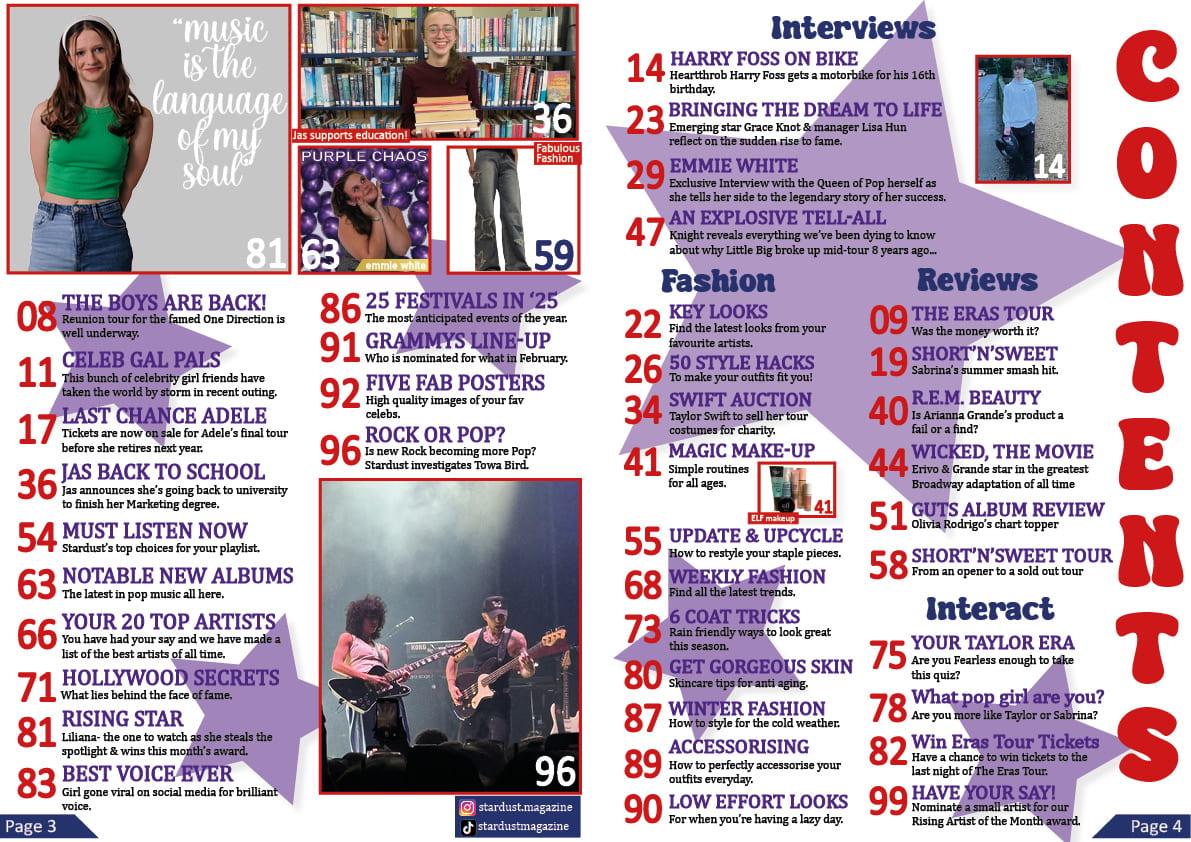
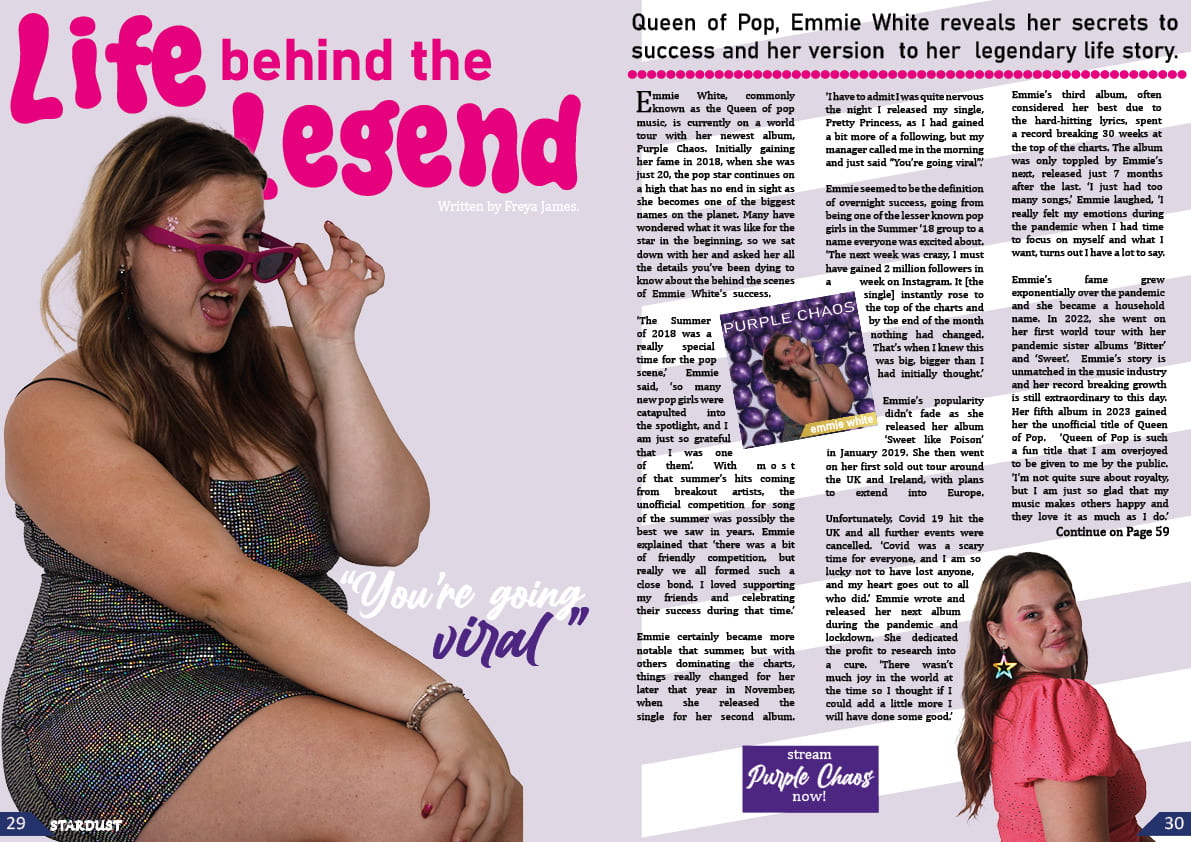
My Final Full Draft 5
Reflection
I have learnt that the media production process has lots of steps and takes a lot of organising to do. I also learnt how to design on InDesign and how to create a star image using mise-en-scene and production design, as well as Photoshop, to manipulate the photos into generically appropriate images for my pop music magazine.
I think I have fulfilled the brief as the media language I used successfully presents Stardust as a pop music magazine. I considered the mise-en-scene and connotations of the colours, costumes, and language I used. I also encoded my magazine with key conventions of the pop music genre in order for my audience to decode that the genre of my magazine is pop.
One lightbulb moment I had was almost at the end of the production process. The background of my contents page was plain white and any other colour made the page overcrowded. Due to this, I tried different graphics such as circles or stripes like on my double page spread, however nothing matched the mise-en-scene on my page, and made the page look too busy. Then, I had the idea to use stars as stars were already a recurring theme throughout my magazine so added to my mise-en-scene perfectly. This made my contents page more visually exciting and engaging to the audience.
One problem I had was with cutting out my model on Photoshop as the lines were slightly jagged and my main cover star image looked too obviously cut out when I put it on my front cover. However, I learnt to be patient and zoom into the image to smooth over the jagged edges with the eraser tool slowly. I also learnt to use a wider range of tools, such as feathering, to fix my problem.
If I were to start again, I would tell myself not to fixate too much on the small things and work on those at the end. I would also give myself the advice of letting my ideas flow naturally rather than try to stick to one plan I made at the beginning.
Draft 4
My Fourth Drafts:


Skills
I used the bevel and emboss effect in InDesign on the circle graphic on the front cover. This makes it stand out more against the page, promoting it as an exciting feature of the magazine to the audience. It also highlights the information (Blumler and Katz) the audience could gain from reading the magazine to attract the audience.
In Photoshop, I brightened the image of my star on the double page spread using a brightness adjustment layer as the photo was dull. I also increased the contrast to ensure the details of the image were sharp. This represents her star image (Dyer) as fun and friendly, encouraging the audience to engage with her more. The edited photo also helps convey the bright energy of the pop genre.
Draft 3
My Third Drafts:


Skills
I used the frame tool to place photos in my magazine. This was important as it allowed me to link the images to the original file so they could be updated. This was useful when creating projects such as the album cover that I used as an inset as I could edit the original InDesign file separately and it would update in the main file. This was helpful as it made my workspace more organised and able to have a higher level of detail in my magazine to engage the audience.
I used the curves in the adjustments panel of Photoshop to white balance the image of the white trainers. I used the eyedropper to select white on the photo and auto adjusted. This made the trainers brighter, allowing them to stand out more as an inset and look appealing to the audience. This represents my magazine as professional through the conventional desirable advert.
My Teacher Feedback:
Targets for Final Draft:
Front cover:
- Make all the images of my main cover star brighter
- Make all insets the same angle so none are canted
- Make my masthead taller
Contents Page:
- Change the page numbers so odd is on the left and even is on the right
- Make my coverlines all uppercase
- Put the same stroke around all my insets
Double Page Spread:
- Move the byline so it’s not next to the article
- Change the page numbers
- Put a little version of my masthead next to the page numbers
DPS Draft 2
My Second Draft:

Reflection
I considered the targets I set to improve on the last draft of my double page spread and adapted parts of my original design to fit the new one. Some of the things I changed from the last draft were these:
- The layout
- I changed this to make the page look more visually engaging and less overcrowded with text.
- The insets
- I included some insets to break up the text and make the page look more exciting for the audience. I also added a caption to ground the inset. This added more conventional features to my page.
- The background
- I added a coloured background to make the page look more interesting so it captures the audience’s attention. The stripes also add movement to the page to create depth.
- The pull quote
- This intrigues the audience and interests them in reading the rest of the article.
- The border between the body and the standfirst
- I added this as it is a colourful way to separate the standfirst and the main body of the article. It also added more graphics to the page and made it more visually interesting for the audience.
- The gutter
- I created a gutter in the middle of the double page spread so no important content gets lost in the fold in the middle of the page.
- The text wrapping
- I used the text wrapping tool to fit the text around the inset to the column flows better.
Skills
I used the text wrapping tool in InDesign to wrap one of the columns around an inset. This breaks up the rigid shape of the text, adding visual excitement to keep the audience engaged. It also builds a relationship between the text and graphics, creating a cohesive and purposeful page.
What’s Next
- Add page numbers
- Add the album cover to the inset placeholder
- Make the pull quote stand out more
- Add a byline
Contents Page Draft 2
My Second Draft:

Reflection
I added on to my first draft of my contents page and changed some things in accordance with my targets to create a better design. Some things that I have changed from the last draft are these:
- New typeface
- I changed some of the text from the bubble font to a different typeface to make the page less overwhelming for the audience to read and navigate.
- Wider range of language techniques used in coverlines
- I have used some alliteration and hyperboles in my coverlines to interest the audience in the article.
- Better alignment
- I have realigned all the text and insets so they are straight and the page is easier to read for the audience.
- More insets
- I have changed the layout of the insets to include more to create a better text to visuals ratio for the reader.
- A quizzes and competitions section of the page
- This allows me to satisfy the social interaction and personal identity aspect of the uses and gratifications to keep my audience interested in my magazine.
Skills
I used the paragraph panel in InDesign to format the text in the captions and coverlines. I deselected the hyphenate button to ensure the words aren’t split between lines. This makes the text easier to read for the audience which is important to provide them entertainment and information (Blumler and Katz) to engage them.
Targets
- Put in the page numbers for contents page
- Put in links to social media sites for the magazine
- Use some superlatives or imperative commands in my coverlines
- Create a more interesting background
- Add captions to my insets
Specsavers Creative Team Feedback
My Feedback Page:

Reflection
I spoke to the creative team of graphic designers and copy writers at Specsavers. They looked at and gave feedback on the second draft of my front cover and the first drafts of my contents page and double page spread. Some of the positive things they said were these:
- The gradient on the background of my front cover was good.
- My text is well aligned on my contents page.
- The different fonts in my coverlines on my front cover is nice
Some targets they suggested I work on were these:
- Brightening the main images on my front cover and double page spread.
- Making the masthead on my front cover taller and adding a drop shadow so it stands out more.
- Adding more graphics to my front cover and double page spread.